Packaging a Publication-Quality Drawing Toolkit: acacia-chem
Packaging a Publication-Quality Drawing Toolkit: acacia-chem
Part 5 of the publication-quality drawing series. Previous: A Reusable Drawing Toolkit · companion note on 2D layout.
The first four posts developed the difficult parts of chemical drawing: consistent styling, reaction composition, abbreviations, highlighting, grids, and dependable two-dimensional coordinates. Until now, however, that work has lived beside the examples that motivated it. Copying a module into each new project is convenient for an experiment, but it is a poor way to maintain scientific software. Fixes drift, imports depend on the working directory, and nobody can tell which version produced a figure.
In this post we turn the drawing code into acacia-chem, a small installable Python package. Packaging is not administrative polish added after the science. It gives the rendering rules a stable public interface, records their dependencies, and makes a figure reproducible from a clean environment. The package still does one job: turn molecular inputs into publication-quality SVG or PNG. It does not become a plotting framework or a general cheminformatics platform.
From working code to a maintained tool
A package boundary forces useful decisions. Callers should not need to know which RDKit drawer creates a panel, how an Indigo layout is transferred, or how SVG bytes are assembled. They should see a compact vocabulary:
draw_molecule,draw_reaction, anddraw_gridwrite files;render_molecule,render_reaction, andrender_gridreturn images in memory;RenderResultdescribes an in-memory image;- layout and abbreviation helpers expose the few reusable configuration concepts.
Everything else remains private. In particular, an initial underscore in _render.py or _errors.py is a promise that applications should not import that module directly. We can reorganize those implementation details later without breaking notebooks, scripts, or the web application planned for Post 6.
The src layout
The repository is organized as follows:
acacia-chem/
├── pyproject.toml
├── README.md
├── examples/
│   ├── example_molecule.py
│   ├── example_reaction.py
│   └── example_grid.py
├── src/
│   └── acacia_chem/
│       ├── __init__.py
│       ├── _abbreviations.py
│       ├── _cli.py
│       ├── _errors.py
│       ├── _grid.py
│       ├── _layout.py
│       ├── _molecule.py
│       ├── _reaction.py
│       ├── _render.py
│       └── _style.py
└── tests/
    ├── conftest.py
    ├── _constants.py
    ├── test_grid.py
    ├── test_layout.py
    ├── test_reaction.py
    ├── test_rendering.py
    └── test_smoke.py
The src layout prevents an easy-to-miss packaging error: tests run against the installed package rather than importing a same-named directory from the repository root. _molecule.py, _reaction.py, and _grid.py own their domain logic. _render.py contains the shared in-memory result and format handling, while _errors.py defines the package's focused exceptions and keeps low-level RDKit or Indigo failures from leaking through the public boundary.
__init__.py re-exports only supported names. A user can therefore write from acacia_chem import draw_molecule instead of depending on the internal module arrangement. Keeping that surface small is what makes semantic versioning realistic.
Rendering, writing, and RenderResult
File output and in-memory output are intentionally separate. The draw_* functions are the convenient choice for manuscripts, reports, and batch jobs: they accept an output path and write the image. Their render_* counterparts perform the same drawing but return a RenderResult without touching the filesystem.
The result object has three essential attributes:
from dataclasses import dataclass


@dataclass(frozen=True, slots=True)
class RenderResult:
    data: bytes
    format: str
    media_type: str
data contains the rendered image bytes, format records the normalized short name ("svg" or "png"), and media_type supplies the corresponding MIME type. SVG is returned as UTF-8 encoded bytes with media_type == "image/svg+xml"; PNG uses media_type == "image/png". This is deliberately less ambiguous than returning either str, bytes, or a Pillow object depending on the format. It also gives future HTTP code exactly the body and Content-Type it needs.
The public functions retain the vocabulary established in the earlier posts. The in-memory render_* functions use format to select "svg" or "png". The file-writing draw_* compatibility API uses fmt, and can infer the format from the output suffix. The use_indigo option selects Indigo coordinate generation, and abbreviations accepts definitions produced by parse_abbreviations. Reaction labels remain agent_text and condition_text, while grid entries remain dictionaries containing at least a smiles value and optionally a label.
Modern, bounded project metadata
pyproject.toml is the build recipe and dependency record. Bounds matter here: a lower bound states the API level we test, while the upper bound prevents an unreviewed future major release from silently changing rendered output.
[build-system]
requires = ["hatchling>=1.27,<2"]
build-backend = "hatchling.build"

[project]
name = "acacia-chem"
version = "0.1.0"
description = "Publication-quality molecule and reaction drawing built on RDKit."
requires-python = ">=3.10"
dependencies = [
    "rdkit>=2024.9,<2027",
    "Pillow>=10.4,<13",
    "epam-indigo>=1.39,<2",
]

[project.optional-dependencies]
test = [
    "pytest>=8.3,<10",
    "ruff>=0.12,<1",
    "mypy>=1.17,<2",
]

[project.scripts]
acacia-chem = "acacia_chem._cli:main"

[tool.hatch.build.targets.wheel]
packages = ["src/acacia_chem"]
The distribution name contains a hyphen, so it is installed as acacia-chem; Python imports use the valid identifier acacia_chem. RDKit provides molecule parsing and drawing, Pillow handles raster composition, and epam-indigo supplies the Indigo core used by the default coordinate path. There is no separate Indigo-core package to add. Hatchling discovers the package under src/acacia_chem and builds standard wheels and source distributions.
During development, install the package and test extra in editable mode from the repository root:
python -m pip install -e ".[test]"
Editable installation leaves source files in place, so the next Python process sees a change immediately. It is ideal while developing; a release or deployment should install a built, immutable wheel instead.
Writing individual figures
The simplest call writes a molecule directly. Because the path ends in .svg, no explicit format is necessary:
from acacia_chem import draw_molecule

aspirin = "CC(=O)Oc1ccccc1C(=O)O"
draw_molecule(aspirin, "figures/aspirin.svg")
SVG should be the default choice for manuscripts because bonds and labels remain sharp at any scale. A .png suffix selects raster output when a journal system or slide deck requires it.
A reaction uses reaction SMILES and the same labels developed earlier in the series:
from acacia_chem import draw_reaction

reaction = "CC(=O)O.OCC>>CC(=O)OCC"
draw_reaction(
    reaction,
    "figures/esterification.svg",
    agent_text="H2SO4 (cat.)",
    condition_text="reflux, 2 h",
)
Grid input keeps structure and caption together. This makes it straightforward to generate a scope table from records loaded from CSV or a database:
from acacia_chem import draw_grid

entries = [
    {"smiles": "c1ccccc1", "label": "Benzene"},
    {"smiles": "Cc1ccccc1", "label": "Toluene"},
    {"smiles": "Oc1ccccc1", "label": "Phenol"},
    {"smiles": "Nc1ccccc1", "label": "Aniline"},
]
draw_grid(entries, "figures/aromatic_scope.png", n_cols=2)
These are intentionally file-writing examples: the return value is not the image. Code that needs the bytes should use the corresponding render_* function rather than writing a temporary file and reading it back.
Layout and abbreviations are configuration, not forks
Coordinate generation can have as much influence on readability as line width or font size. The Indigo core, installed through the required epam-indigo dependency, is the default layout engine for molecule and reaction drawing. Its fused-ring orientation is the reason an ordinary call needs no layout option:
from acacia_chem import draw_molecule

indole = "c1ccc2[nH]ccc2c1"
draw_molecule(indole, "figures/indole.svg")
Callers can explicitly request the RDKit layout fallback with use_indigo=False. Whichever engine is used, stereochemistry and conventional orientation still require visual review. A coordinate generator is not a chemical proofreader.
Abbreviations are parsed once and passed to any drawing operation:
from acacia_chem import draw_molecule, parse_abbreviations

abbreviations = parse_abbreviations(
    "Boc *C(=O)OC(C)(C)C\n"
    "Ph *c1ccccc1"
)
draw_molecule(
    "CC(C)(C)OC(=O)NCCc1ccccc1",
    "figures/boc-phenethylamine.svg",
    abbreviations=abbreviations,
)
Keeping this parser public avoids duplicating SMARTS preparation in every caller. The matching and condensation machinery stays private, where it can evolve without multiplying APIs.
Rendering in memory
For a notebook widget, object store, or web endpoint, use render_molecule:
from acacia_chem import render_molecule

result = render_molecule(
    "CC(=O)Oc1ccccc1C(=O)O",
    format="svg",
)

assert result.media_type == "image/svg+xml"
svg_bytes = result.data
No temporary path is involved. In a future HTTP service, those same fields can be returned directly—for example, Response(content=result.data, media_type=result.media_type). The package itself remains independent of any web framework; translating a RenderResult into an HTTP response belongs at the application boundary.
render_reaction and render_grid follow the same convention. That symmetry is more important than clever convenience methods: once a caller understands one renderer, the other two are predictable.
A command-line interface
The console entry point makes the package useful in shell scripts and continuous-integration jobs without a Python wrapper:
acacia-chem draw-molecule "CC(=O)Oc1ccccc1C(=O)O" figures/aspirin.svg
acacia-chem draw-reaction "CC(=O)O.OCC>>CC(=O)OCC" figures/esterification.svg \
  --agents "H2SO4 (cat.)" --conditions "reflux, 2 h"
acacia-chem --help
The CLI is a thin adapter over the public functions, not a second implementation. It validates arguments, reports errors with a nonzero exit status, and lets the filename determine SVG or PNG in the same way as Python calls. Keeping parsing in _cli.py also prevents command-line concerns from entering the rendering core.
Difficult scaffolds
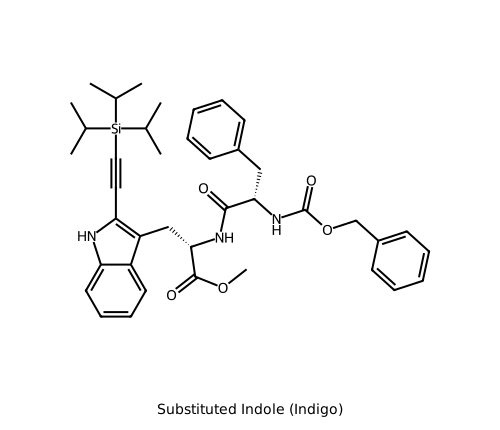
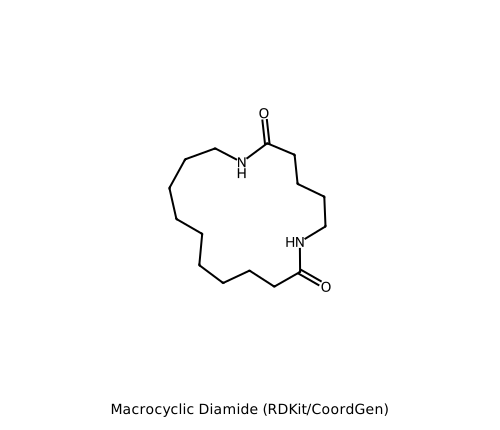
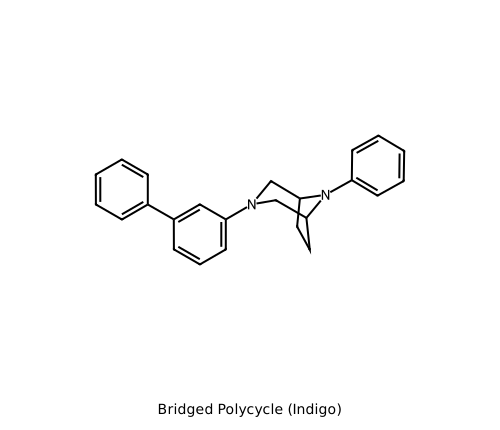
The companion note on 2D layout identified scaffolds that routinely trip up 2D coordinate generators: substituted indoles, macrocycles, bridged and constrained polycycles, fused tricycles with stereochemistry, and fixed-core chromane analogs. acacia-chem renders each with the engine selected in that note. The generate_problematic_molecules.py script in this directory reproduces both the SVG and PNG outputs; the SMILES used for each are printed explicitly below.
Substituted indole (Indigo)
COC(=O)[C@H](Cc1c(C#C[Si](C(C)C)(C(C)C)C(C)C)[nH]c2ccccc12)NC(=O)[C@H](Cc1ccccc1)NC(=O)OCc1ccccc1
Macrocyclic diamide (RDKit/CoordGen)
O=C1NCCCCCCCCCC(=O)NCCCC1
Bridged polycycle (Indigo)
C1CC2CN(CC1N2c1ccccc1)c1cccc(c1)-c1ccccc1
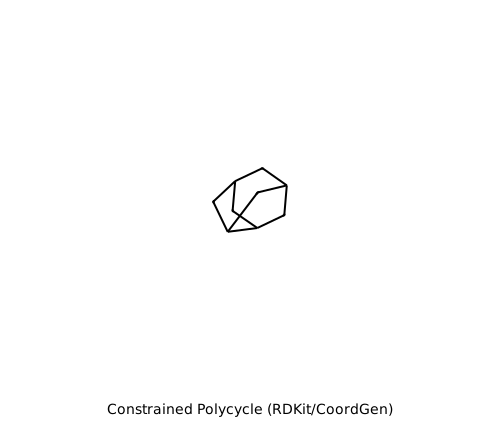
Constrained polycycle (RDKit/CoordGen)
C12CC3CC(CC3C1)C2
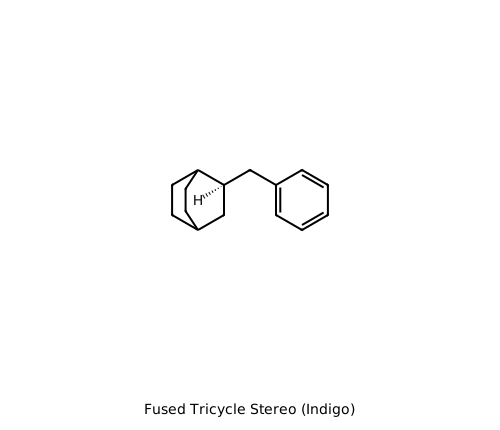
Fused tricycle stereochemistry (Indigo)
C([C@H]1CC3CCC1CC3)(c4ccccc4)
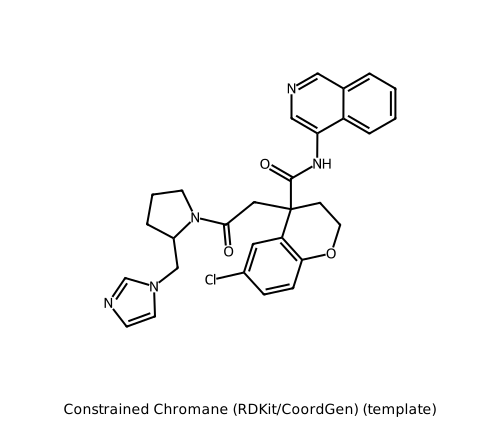
Constrained chromane (RDKit/CoordGen, template)
c1ccc2c(c1)cncc2NC(=O)C3(CCOc4c3cc(cc4)Cl)CC(=O)N5CCCC5Cn6ccnc6
The chromane example uses create_layout_template on the simpler core c1ccc2c(c1)cncc2NC(=O)C3CCSc4c3cc(cc4)Cl and passes that template to draw_molecule, so the fixed scaffold keeps the same orientation while the side chain is laid out around it.
Testing the package, not just the pictures
Image software needs more than snapshots. Tests should verify that valid molecule, reaction, and grid inputs produce nonempty data with the correct media type; that SVG is well formed; that PNG starts with its standard signature; and that file-writing wrappers write exactly the requested format. Invalid SMILES, unsupported formats, unwritable destinations, and unavailable layout engines should produce focused package errors rather than partial files or opaque backend traces.
A small contract test for in-memory rendering is stable across harmless coordinate changes:
from acacia_chem import render_molecule


def test_render_molecule_svg_contract() -> None:
    result = render_molecule("c1ccccc1", format="svg")

    assert result.media_type == "image/svg+xml"
    assert b"<svg" in result.data
The test extra also installs the formatting, linting, and type-checking tools. Run every quality gate locally, followed by the verbose test suite:
ruff format --check
ruff check
mypy src/acacia_chem
pytest -v
Linux CI runs those four commands across Python 3.10, 3.11, and 3.12, then performs a real CLI smoke test. A runner's command sequence is:
python -m pip install --upgrade pip
python -m pip install -e ".[test]"
ruff format --check
ruff check
mypy src/acacia_chem
pytest -v
acacia-chem draw-molecule "CCO" /tmp/acacia-chem-smoke.svg
test -s /tmp/acacia-chem-smoke.svg
The matrix catches version-specific behavior, while the CLI smoke test verifies that the installed entry point writes a nonempty image. Because chemical depictions can change across backend versions, exact pixel snapshots should be few and deliberate; semantic assertions and selected reviewed reference images produce a less brittle suite.
What packaging buys us
We now have a toolkit rather than a folder of helpers. Its distribution metadata records a bounded, testable environment. Its src layout verifies that installation works. Its small public API separates stable concepts from RDKit, Pillow, and Indigo implementation details. Most importantly, file and memory workflows share one rendering core, so the image shown by an application is generated by the same code that writes a manuscript figure.
Post 6 will build a web frontend on this foundation. A user will submit a molecular input, choose drawing options, and receive the bytes from render_molecule (or its reaction and grid counterparts) with the matching media type. Because HTTP was kept outside acacia-chem, that frontend can concentrate on interaction and validation while this package remains a focused, reusable publication-quality drawing engine.