Getting Indole Orientation Right: A Technical Note on 2D Molecular Layout
Getting Indole Orientation Right: A Technical Note on 2D Molecular Layout
Companion post to: A Reusable Drawing Toolkit
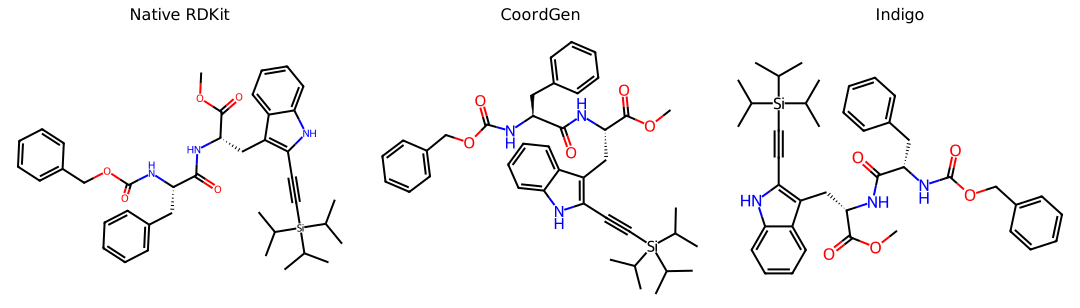
When we drew structures for the TIPS-alkyne paper, RDKit produced a chemically correct depiction with a visibly distorted amide C=O bond. This reflects a deeper limitation shared by RDKit and CoordGen when they lay out fused ring systems: the initial indole orientation is chosen by a graph-traversal heuristic that does not account for attached substituents. Similar problems occur with benzimidazoles, purines, carbazoles, and other fused scaffolds substituted on both sides. The resulting depiction is rarely chemically wrong, but it can conflict with the visual conventions expected in a publication.
ChemDraw addresses much of this problem with a large, curated library of ring-system templates. For an indole, it retrieves a preferred orientation before attaching substituents to the fixed scaffold. These templates encode editorial conventions that geometry alone cannot capture, such as which side of a fused ring should face a carbonyl and how to orient a heterocycle so labels and stereochemical wedges remain readable.
This post describes our effort to create publication-quality 2D layouts with RDKit: what we tried, why those approaches failed, and the hybrid solution that worked.
The Problem
Molecules 5a through 5g share a 2,3-disubstituted indole core: a tryptophan-derived alpha-amino ester with a TIPS-alkyne at C3. Our preferred orientation places the:
- Benzo ring toward the methyl ester
- NH and NHCbz chain at the upper right
- TIPS-alkyne away from the ester chain
RDKit consistently chose the opposite orientation. The benzo ring faced the amide, the NHCbz chain crowded the ring, and the carbonyl bond was visibly skewed. The output was chemically correct but visually unsuitable for publication.
What We Tried
AlignMol (rigid-body alignment)
Our first attempt applied a rigid-body rotation to align existing coordinates with a reference molecule. This failed because it rotates and translates the entire molecule without changing its internal geometry or the incorrect ring orientation.
GenerateDepictionMatching2DStructure with MCS
This is the appropriate RDKit tool for constraining a common core. It fixes the atoms in the maximum common substructure (MCS) to the reference coordinates and lays out the remaining atoms. It improved the carbonyl geometry, but the TIPS-alkyne still pointed toward the methyl ester chain and created a collision.
CoordGen backend (SetPreferCoordGen(True))
CoordGen is a modern graph-based layout engine that often produces cleaner depictions than RDKit's classic depictor. For these molecules, it changed some bond angles but selected the same incorrect indole orientation. The orientation decision occurs early in graph traversal, where CoordGen makes the same choice as RDKit.
Custom ring system templates (AddRingSystemTemplates)
RDKit exposes an API to register pre-computed 2D templates for ring systems, the same mechanism ChemDraw uses internally. We tested this extensively:
- The template must use Kekulized CXSMILES. Aromatic
[nH]SMILES raise anAtomKekulizeExceptionin RDKit's template parser. - A template such as
C1=CC=C2NC=CC2=C1 |(coords)|loads successfully. - The template has no effect on substituted indoles.
This is the key finding. AddRingSystemTemplates matches ring systems by exact topology. Adding substituents at C2 and C3 makes the indole topologically distinct from unsubstituted indole, so RDKit ignores the template. We confirmed this empirically:
# Layouts with and without the template have identical coordinates.
atoms with different coords: 0 out of 42
template has NO effect
The same limitation applies to PubChem-sourced SDF coordinates. They may be high quality, but RDKit's public API cannot apply them to a substituted ring system.
Geometric reflection post-processing
Since we could not prevent RDKit from choosing the wrong orientation, we tried to detect and correct it after the fact. The approach:
- Match the indole SMARTS
[nH]1ccc2ccccc21to identify C3a and C7a, the fusion-bond atoms. - Use the cross-product sign to determine the side of the C3a-C7a axis occupied by the benzo ring and methyl ester.
- Reflect the molecule when the detected orientation is incorrect.
The detection logic worked, but reflection did not. The C3a-C7a bond is not a symmetry axis of the benzo ring; it is a chord of the hexagon. Reflecting C4 through C7 across that chord distorts the hexagon and produces incorrect bond lengths and angles. We also tried rebuilding the hexagon analytically, but the non-orthogonal fusion axis still produced visibly twisted geometry.
Known Depiction Limits
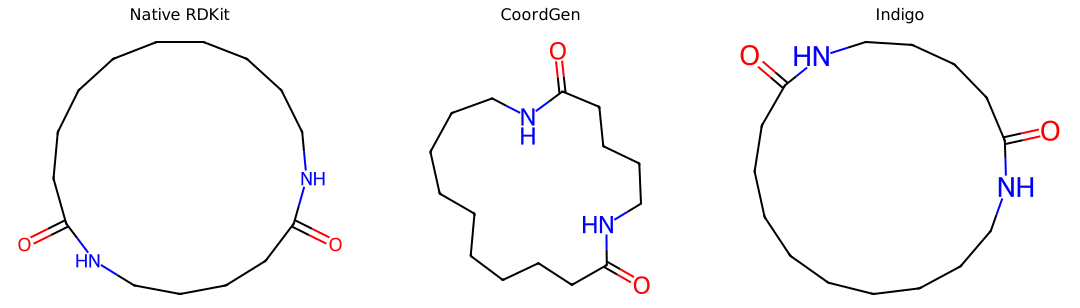
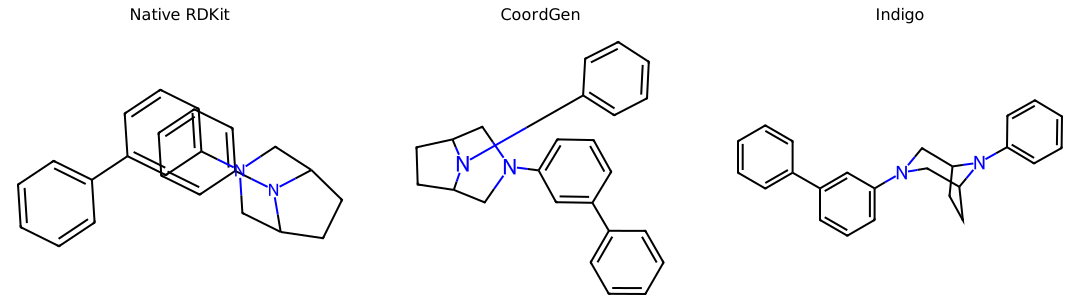
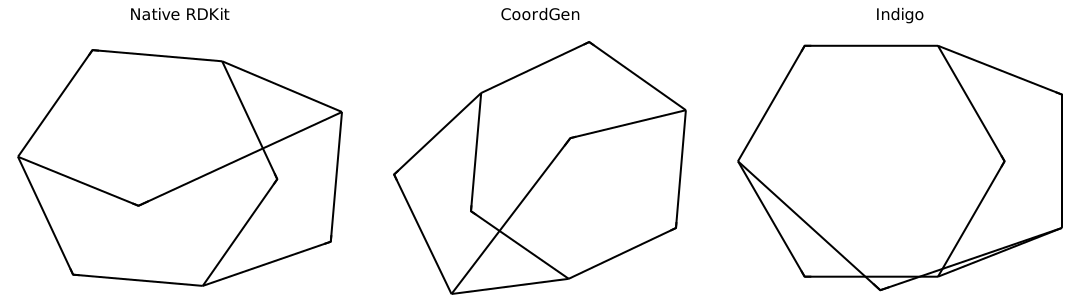
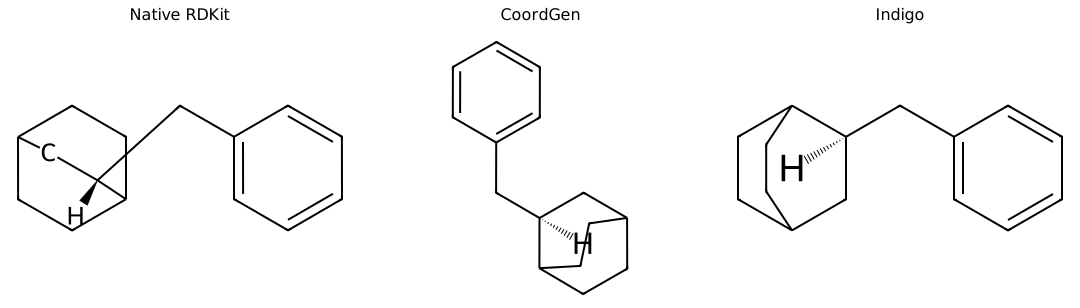
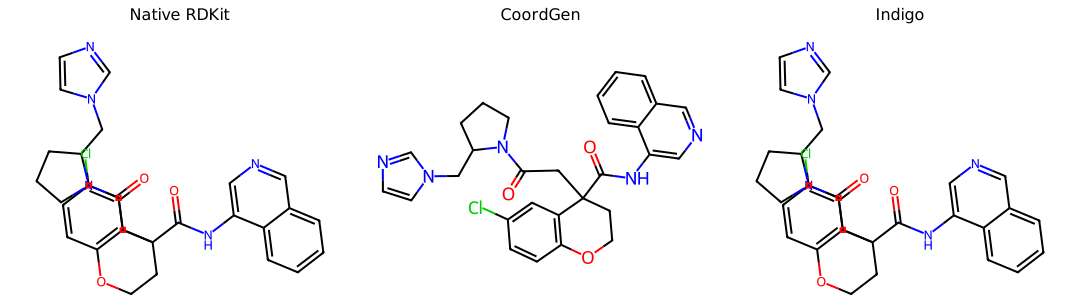
The following comparisons use the same molecule with native RDKit, CoordGen, and Indigo coordinate generation, then render each result with RDKit. The preferred panel is an authoring decision for this benchmark, not a claim that another depiction is chemically invalid.
| Case | Documented concern | Source | Selected drawer |
|---|---|---|---|
| Substituted indole | Fused-ring orientation and substituent clearance | Post 4 indole example | Indigo |
| Macrocyclic diamide | Circular native macrocycle depiction | RDKit discussion #8232 | CoordGen |
| Bridged polycycle | Native 2D clashes | RDKit #6753 | Indigo |
| Constrained polycycle | CoordGen regression | RDKit #3491 | CoordGen |
| Fused tricycle stereochemistry | Collinear bonds can compromise MolBlock stereo interpretation | RDKit #7177 | Indigo |
| Constrained chromane | Fixed-core coordinate maps can create side-chain clashes | RDKit discussion #6518 | CoordGen |
Substituted indole
Macrocyclic diamide
Bridged polycycle
Constrained polycycle
Fused tricycle stereochemistry
Constrained chromane
The benchmark suggests a practical review order. Start with native RDKit for routine structures. Try CoordGen when global spacing, macrocycles, or constrained additions are the main concern. Try Indigo for compact fused or bridged polycycles where conventional orientation matters. When a reaction and its scope table must preserve an author-approved orientation, save the coordinate reference as a LayoutTemplate. Every publication figure still requires visual review because coordinate generators cannot encode every community convention.
The Solution: Indigo + RDKit Hybrid
After exhausting the RDKit-native options, we tested Indigo (EPAM's open-source cheminformatics toolkit). Its independent 2D layout engine uses different heuristics and produces the correct indole orientation for our molecules out of the box.
Using Indigo for both layout and rendering was not suitable because we needed RDKit's abbreviation support, custom styling, and SVG output.
The working hybrid is:
from indigo import Indigo
from rdkit import Chem
from rdkit.Chem import AllChem, rdFMCS

def compute_ref_coords_with_indigo(ref_mol: Chem.Mol) -> bool:
    """Lay out ref_mol using Indigo, transfer coords back to RDKit mol."""
    try:
        indigo = Indigo()
        smi = Chem.MolToSmiles(ref_mol)
        imol = indigo.loadMolecule(smi)
        imol.layout()
        laid_out = Chem.MolFromMolBlock(imol.molfile(), removeHs=True)
        if laid_out is None:
            return False
        # Transfer coords via MCS match (atom ordering may differ)
        mcs = rdFMCS.FindMCS([laid_out, ref_mol],
            atomCompare=rdFMCS.AtomCompare.CompareElements,
            bondCompare=rdFMCS.BondCompare.CompareOrderExact)
        mcs_q = Chem.MolFromSmarts(mcs.smartsString)
        src = laid_out.GetSubstructMatch(mcs_q)
        dst = ref_mol.GetSubstructMatch(mcs_q)
        src_conf = laid_out.GetConformer()
        dst_conf = ref_mol.GetConformer()
        AllChem.Compute2DCoords(ref_mol)  # create conformer first
        for si, di in zip(src, dst):
            p = src_conf.GetAtomPosition(si)
            dst_conf.SetAtomPosition(di, (p.x, p.y, 0.0))
        return True
    except Exception:
        return False
Then for each molecule in the grid:
mcs = rdFMCS.FindMCS([ref_mol, mol],
    atomCompare=rdFMCS.AtomCompare.CompareElements,
    bondCompare=rdFMCS.BondCompare.CompareOrderExact,
    ringMatchesRingOnly=True)
ref_patt = Chem.MolFromSmarts(mcs.smartsString)
AllChem.GenerateDepictionMatching2DStructure(
    mol, ref_mol, acceptFailure=True, refPatt=ref_patt
)
Why this works:
- Indigo places the indole in the preferred orientation for this scaffold.
- RDKit's
GenerateDepictionMatching2DStructure, with an explicitrefPatt, fixes the MCS atoms to the Indigo reference positions and lays out only the variable substituents. - The result combines Indigo's indole geometry with RDKit's chirality-consistent stereo wedges and bond styling.
One important detail: any function that calls AllChem.Compute2DCoords(ref_mol) unconditionally will overwrite the Indigo coordinates. Guard these calls:
if not ref_mol.GetNumConformers():
    AllChem.Compute2DCoords(ref_mol)
Reference molecule choice matters. For the 5a to 5c comparison, 5c gave the best geometry across the series because its Indigo layout most closely matched the preferred orientation. Choose the reference molecule whose layout best represents the desired convention for the full series.
Result
Before (RDKit default / CoordGen):
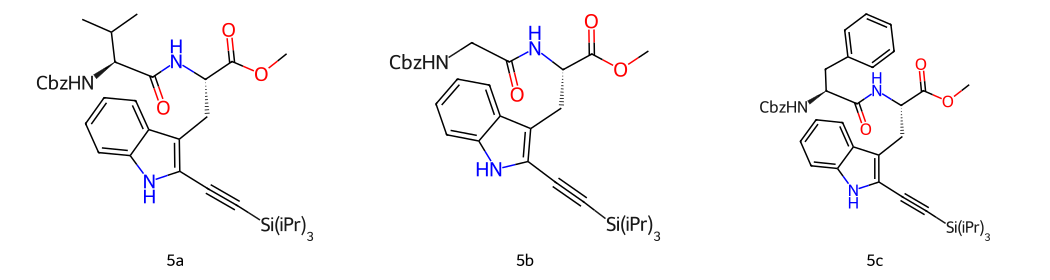
- Indole ring facing NHCbz chain
- Carbonyl bond skewed by about 15 degrees
- Undesirable benzyl orientation for 5c
After (Indigo + RDKit hybrid):
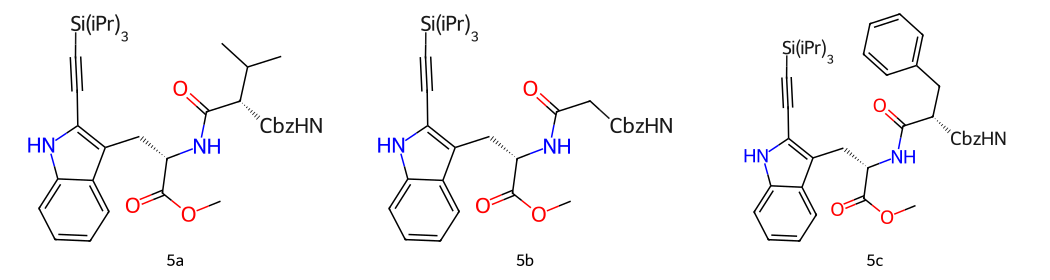
- Indole ring facing the methyl ester, consistent with the preferred convention
- Bonds at standard angles
- Benzyl group for 5c in the preferred orientation
Lessons
- RDKit's ring system template API is limited to unsubstituted ring systems. For medicinal chemistry scaffolds with invariably substituted cores (indole, benzimidazole, purine), templates via
AddRingSystemTemplateswill never help. GenerateDepictionMatching2DStructureis the right alignment tool, but it depends entirely on the reference coordinates being good. Garbage in, garbage out.- Different layout engines disagree on orientation conventions. Indigo and RDKit make different choices for the same scaffold. Neither is universally "correct." Rather, it depends on the context and the chemical community's conventions.
- The hybrid approach is fragile to coordinate-overwriting. Any function in your pipeline that calls
Compute2DCoordsunconditionally will silently undo the Indigo layout. Audit every coord-generating call. - For a robust long-term solution, the right fix is a curated coordinate template library matched to your specific scaffold classes, applied before the first
Compute2DCoordscall, or a purpose-built layout model trained on ChemDraw-quality reference structures.